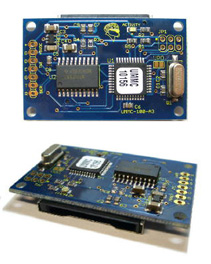
| Features | |
|---|---|
| Card Types | SD/miniSD/microSD |
| Card Format | MMC/SD/SDHC |
| Card Sizes | 8MB → 32GB |
| File Systems | FAT12 FAT16 FAT32 |
| Control Interface | TTL Serial |
| Serial Interface | 8 bits, no parity, 1 stop bit |
| Serial Speeds | 2400, 4800, 9600, 19200, 38400, 57600, 115200, 230400, 460800 bps |
| Operating Temperature | -40°C to +85°C |
| Physical Size | 2×1.25 inches (50.8×31.75 mm) |
| Power Source | 3 → 5 Volts |
| Chipset Available | Yes - 44 lead TQFP, or 44 pad QFN |
| Operating Temperature | -55°C to +125°C |
|---|---|
| Storage Temperature | -65°C to +150°C |
| Voltage on any pin | -0.5V to Vcc+0.5V |
| Maximum Operating Voltage | 6.0V |
WARNING Exceeding values beyond these absolute maximum values may cause permanent damage to the device and/or card! Operating at absolute maximum rating conditions for extended periods may affect device and/or card reliability.
| Parameter | Min | Typ | Max | Units |
|---|---|---|---|---|
| Power Supply Current | ||||
| Icc: Idle, Vcc=5V, No card | 11 | 15 | mA | |
| Icc: Idle, Vcc=3V, No card | 5.5 | 8 | mA | |
| Icc: Idle, Vcc=5V, w/card | 12 | 40+1) | mA | |
| Icc: Idle, Vcc=3V, w/card | 6 | 30+2) | mA | |
| Icc: Active (R/W), Vcc=5V | 25 | 2503)4) | mA | |
| Logic Input Low | -0.5 | 0.2 Vcc5) | V | |
| Logic Input High | 0.6 Vcc6) | V | ||
| Logic Output Low @ Vcc=5V | 0.7 | V | ||
| Logic Output Low @ Vcc=3V | 0.5 | V | ||
| Logic Output High @ Vcc=5V | 4.0 | V | ||
| Logic Output High @ Vcc=3V | 2.2 | V |
The Protocol for the uMMC employs a simple but robust asynchronous serial control protocol. A command prompt ”>” (“greater than” symbol, ASCII 62, HEX 0x3E) indicates that the uMMC is ready to accept a command. A command can be sent, a response will be returned, and the command prompt will be sent again.
Example:
F«cr»
1>
If an error occurs while processing a command, an error is returned in the format
”Enn”. See the table of error codes.
Example:
>O 1 R /LOGS/2004/FEBRUARY/FEB30.LOG«cr»
EF2>
C«sp»Parameter1«sp»Parameter2«sp»…«cr»
Where:
C is a single command character.«sp» is a single space character (ASCII 32, HEX 0x20).Parameter1, Parameter2, … are parameters associated with the command«cr» is a carriage return character (ASCII 13, HEX 0x0d)
C Parameter1 [Parameter2 [Parameter3]]…
C is the command character. A single character.Parameter1 is the first parameter for the command.Parameter2 is the second parameter for the command. If it is listed inside of square brackets [ ] then the parameter is optional.Any parameters listed inside of square brackets [ ] are optional. Most commands that have optional parameters will require the previous parameter to be given.
In general, responses are of the format:
[[«sp»][data]] | [Enn]
Error codes are returned as Enn, where nn is a hexadecimal code indicating the error. See the table of error codes.
Change the attributes of a file.
In the FAT file system, there are 4 attributes which can be set:
You can not combine adding and removing of attributes in a single command. i.e. you must only add or only remove attributes per command.
A +|- attribute path
attribute is one or more of “R”, “H”, “S”, or “A”.path is the absolute path to a file/directory. A properly formatted path must begin with a ”/” (forward slash) and begins at the root directory. Subdirectories are separated with ”/” (forward slash)./logs/january/jan3.log
NULL | Enn
To set “read-only” attribute for a file:
A +R /filename.txt
To remove “hidden” and “system” attributes for a file:
A -HS /filename.txt
This command will copy data from an open file to another open file. Requirements: Two files must be open, one for reading, and the second for writing. e.g.
O 1 R /sourcefile.txt O 2 RW /destfile.txt
Copy File will copy from the current location in the source file, up to “num” bytes if specified, to the destination file (starting at the destination's current location).
You can interrupt the transfer at any time by sending «ESC» (ASCII 27, HEX 0x1B).
B fh1 fh2 [num]
fh1/fh2 is a file handle (1 - 4). Use the Free Handle command to get a free file handle.num is the number of bytes to copy from fh1 to fh2. If num is not given, or is greater than the size of fh1, then the entire contents of fh1 is copied.
NULL | response | Enn
response depends on the C setting shown below.
C = 0:
NULL
C = 1:
#########...####
C = 2:
nn..nn bytes copied at r..rr bytes/second
C = 3:
#####...####nn..nn bytes copied at r..rr bytes/second
To copy 200 bytes from the current location of handle 1 to handle 2:
B 1 2 200
To copy the entire source file to the destination file:
O 1 R /sourcefile.txt O 2 RW /destfile.txt B 1 2
To copy 600 bytes from position 12000 of handle 1, to handle 3, starting at position 50000:
O 1 R /sourcefile.txt O 3 RW /destfile.txt J 1 12000 J 3 50000 B 1 3 600
To copy the entirety of handle 1 to the end of handle 2 (appended):
O 1 R /sourcefile.txt O 2 RW /destfile.txt J 2 E B 1 2
or (note that the destination file is opened for append)
O 1 R /sourcefile.txt O 2 A /destfile.txt B 1 2
Closes an open file handle. If no file handle is given, all open file handles are closed.
C [fh]
fh is a file handle (1 - 4). Use the Free Handle command to get a free file handle.
NULL | Enn
Close file handle 1:
C 1
Close all files:
C
Erases/deletes the given file/directory. If the path given is a directory, it must be empty before it can be deleted.
E path
path is the absolute path to a file/directory. A properly formatted path must begin with a ”/” (forward slash) and begins at the root directory. Subdirectories are separated with ”/” (forward slash)./logs/january/jan3.log
NULL | Enn
To delete a directory:
E /emptydir
To delete a file:
E /filename.txt
Free Handle returns the next available file handle.
F
None
When no files are open:
F
1
When all files are open:
F
E03
Gives the file position and the file size for the given file handle.
I fh
fh is a file handle (1 - 4). Use the Free Handle command to get a free file handle.
response | Enn
response is in the following format:
pp..ppp/ss..sss
where:
pp..ppp is the current byte position in the filess..sss is the file size.
pp..ppp and ss..sss are separated by a forward slash '/'.
For a file handle whose byte position is 3250 for a file which is a total of 560700 bytes:
I 1
3250/560700
Jumps to any location in a file. If you use ”E” as the second parameter, Jump will seek to the end of the file.
If the file is opened for writing, the Jump command will automatically extend the file if addr specified is larger than the file size. This is useful for pre-allocating a file to reduce delays during writing.
Important
If the file is extended, the data beyond the end of the file is undefined, so care must be taken to ensure your data is terminated properly.
You can use this command in junction with the Truncate command to pre-allocate then truncate the file.
J fh addr|E
fh is a file handle (1 - 4). Use the Free Handle command to get a free file handle.addr is the position to which you want to jump/seek.E can be used to jump to the end of the file.
NULL | Enn
To jump to byte position 2000 in file handle 1:
J 1 2000
To jump to the end of file handle 2:
J E 2
Gets card specific information for the inserted card. If no parameters are given, then the raw byte data for the CSD (16 bytes) and CID (16 bytes) are returned (32 raw bytes total).
If the parameter is ”B”, then the CSD and CID are ASCII encoded - i.e. Two ASCII characters for each raw byte. e.g. 0x3E is sent as 3E - two characters.
If the parameter is ”I”, then more data is returned (separated by «CR»).
Card type is one of:
| Card type | Description |
|---|---|
| 1 | MMC (MultiMedia Card) |
| 2 | SD V1 (Secure Digital Card) |
| 4 | SD V2 (Secure Digital Card) |
| 12 | SDHC (Secure Digital - High Capacity Card) |
CSD, CID, and OCR are all sent as ASCII encoded (i.e. Two ASCII characters for each raw byte).
K [B | I]
B - optional parameter to return ASCII encoded CSD and CID.I - optional parameter to return more data in ASCII encoded form.K
«SP»16RAWBYTES
K B
«SP»002600321F5983C4FEFACFFF924040C103534453443235365540116A94003C29
K I
«SP»Card type: 2 CSD:002600321F5983C4FEFACFFF924040C1 CID:03534453443235365540116A94003C29 OCR:80FF8000
The List Directory command will list all the files in a given path. If the path is a file, then only the details for that file are given. If the path contains wildcards, then the files matching the pattern will be returned.
List Directory (L path) lists all files that match path without interruption. If a directory is large, this can be difficult to manage. In that case, use LS path to begin a directory listing iteration process, then use LI pattern to iterate through the listings.
L path
LC path
LS path
LI pattern
path is the absolute path to a file/directory. A properly formatted path must begin with a ”/” (forward slash) and begins at the root directory. Subdirectories are separated with ”/” (forward slash)./logs/january/jan3.logpattern - a filename pattern which can contain wildcards (”?” and ”*”).— —
LC path returns the count of files that match the path.
LS path starts a List Directory iteration process.
LI pattern iterates through a directory listing, returning the next file that matches pattern. pattern is required (just use ”*” to match everything).
For L path and LC path, path can also contain wildcards (”?” and ”*”).
In LS path, path can not contain wildcards, and must point to a directory.
«sp»response | Enn
response has one of two formats based on the ”L” setting.
L = 0:
<<sp>>D | ss..sss filename1<<cr>> D | ss..sss filename2<<cr>> ... D | ss..sss filenameN<<cr>>
where:
D indicates a directoryss..sss is the size of the filefilenameN is the filename or directory nameL = 1:
<<sp>>DRHSA yyyy/mm/dd hh:mm:ss ss..sss filename1<<cr>> DRHSA yyyy/mm/dd hh:mm:ss ss..sss filename2<<cr>> ... DRHSA yyyy/mm/dd hh:mm:ss ss..sss filenameN<<cr>>
where:
DRHSA are the attributes for the file. If the attribute is not set, the value is ”-”. D indicates a directory.yyyy/mm/dd hh:mm:ss is the modification date of the file/directory.filenameN is the filename or directory name
”L” setting = 0:
L /
«sp»D DCIM«cr» 721886 B0000.mp3«cr» 40192 B0001.mp3«cr» 23318 B0002.mp3«cr» 46519 hidden.txt«cr»
”L” setting = 1:
L /
«sp»D---- 2009/05/10 11:03:54 DCIM«cr» ----A 721886 2009/05/13 10:12:16 B0000.mp3«cr» ----A 40192 2009/05/13 10:12:16 B0001.mp3«cr» ----A 23318 2009/05/13 10:12:16 B0002.mp3«cr» --H-A 46519 2009/05/13 10:22:38 hidden.txt«cr»
Using wildcards:
L /PICTURES/*.JPG
«sp»----A 2008/09/23 09:18:32 2021392 IMG_2538.JPG«cr» ----A 2008/09/23 09:31:26 1662290 IMG_2542.JPG«cr» ----A 2008/09/23 09:32:02 1893947 IMG_2543.JPG«cr» ----A 2008/10/30 12:34:50 1117269 IMG_2551.JPG«cr»
File count (with wildcard):
LC /PICTURES/*.JPG
«sp»4
Iteration example:
LS /PICTURES
«sp»
LI *.JPG
«sp»----A 2008/09/23 09:18:32 2021392 IMG_2538.JPG«cr»
LI *.JPG
«sp»----A 2008/09/23 09:31:26 1662290 IMG_2542.JPG«cr»
LI *.JPG
«sp»----A 2008/09/23 09:32:02 1893947 IMG_2543.JPG«cr»
LI *.JPG
«sp»----A 2008/10/30 12:34:50 1117269 IMG_2551.JPG«cr»
LI *.JPG
E07
The Make Directory command will create a directory at the path specified.
M path
path is the absolute path to a file/directory. A properly formatted path must begin with a ”/” (forward slash) and begins at the root directory. Subdirectories are separated with ”/” (forward slash)./logs/january/jan3.log
NULL | Enn
M /LOGS/JANUARY
Renames/moves a file from one path to another.
N path|newpath
path and newpath are separated by a vertical bar/pipe/vertical slash '|'.
newpath must not already exist.
path/newpath is the absolute path to a file/directory. A properly formatted path must begin with a ”/” (forward slash) and begins at the root directory. Subdirectories are separated with ”/” (forward slash)./logs/january/jan3.log
NULL | Enn
Rename a file:
N /www/index.html|/www/index.htm
Move a directory:
N /www/images|/images
Opens a file handle in one of 4 different modes described above.
If a file is created, the file modification date is set to the current time from the built-in RTC (Real Time Clock). You can change the time by using the Time command. You can modify the file modification date using the Change Timestamp command.
O fh mode path
fh is a file handle (1 - 4). Use the Free Handle command to get a free file handle.mode is one of:R” – Open in read-only mode. No data can be written to the file.W” – Open in write mode. This opens a new file for writing. The file must not already exist.A” – Open in append mode. This opens a new or existing file for writing. Once opened, the file handle is positioned at the end of the file.RW” – Open in read/write mode. This opens a new or existing file for reading and/or writing. Once opened, the file handle is positioned at the beginning of the file.path is the absolute path to a file/directory. A properly formatted path must begin with a ”/” (forward slash) and begins at the root directory. Subdirectories are separated with ”/” (forward slash)./logs/january/jan3.log
NULL | Enn
Open a file for reading:
O 1 R /LOGS/JANUARY/JAN03.LOG
Open a file for reading and writing:
O 1 RW /www/httpdocs/chatlog/chatlog002.log
Returns the free space and the total size of the inserted card. The two values given are in decimal format and in kibibytes (i.e. 1024 bytes per kibibyte).
Q [A]
A displays the file system type as well as the free/total information.
response | Enn
If there are no parameters, response is of the form:
uu..uuu/tt.ttt
where:
uu..uuu is the free space on the card.tt..ttt is the total space on the card.
If ”A” parameter is given, response is of the form:
FATff«cr» uu..uuu/tt.ttt
where:
uu..uuu is the free space on the card.tt..ttt is the total space on the card.Q
51245/61525
Q A
FAT12«cr» 51245/61525
You can read up to 512 bytes at a time using the Read command. If the num parameter is larger than the number of bytes remaining to be read from the file, then only the remaining bytes are returned. Use the Info command to find the current position. If the Read command is successful, a single «sp» character is sent, followed by the data. If an error occurs, the first character returned is ”E”, followed by an error code. Data is sent verbatim (i.e. raw data) from the file.
R fh [num [addr]]
fh is a file handle (1 - 4). Use the Free Handle command to get a free file handle.num is the number of bytes to read. Optional. If not specified, up to 512 bytes will be returned.addr is the address at which to start reading. Optional. num must be given for this parameter to be used.
«sp»response | Enn
response is preceded by a «sp», indicating a good read. The length of response is variable, and depends on the num parameter, the position of the file handle, and the size of the file.
File handle position = 0, file size = 38 bytes:
R 1
«sp»13:22:02 ADC1=4.9V«cr» 13:22:32 ADC1=4.9V«cr»
A subsequent read:
R 1
E07
Same file, read only 18 bytes (starting at address 0):
R 1 18 0
«sp»13:22:02 ADC1=4.9V
The Read Line command is very similar to the Read command, except that data is returned up to the next EOL terminator. The ”E” setting determines the type of EOL terminator that is checked. The EOL terminator is not returned, only the data up to the EOL.
RL fh [num [addr]]
fh is a file handle (1 - 4). Use the Free Handle command to get a free file handle.num is the number of bytes to read. Optional. If not specified, up to 512 bytes will be returned.addr is the address at which to start reading. Optional. num must be given for this parameter to be used.
«sp»response | Enn
response is preceded by a «sp», indicating a good read. The length of response is variable, and depends on the num parameter, the position of the file handle, the size of the file, and the location of the next EOL. Refer to the ”E” setting.
File handle position = 0, file size = 38 bytes. This response differs from what is returned by the Read command:
RL 1
«sp»13:22:02 ADC1=4.9V
RL 1
«sp»13:22:32 ADC1=4.9V
RL 1
E07
Same file, read only 18 bytes (starting at address 0):
RL 1 18 0
«sp»13:22:02 ADC1=4.9V
Settings are non-volatile, and are loaded on power up.
When the unit is put into Update Mode, the default setting values (shown in the settings table) are restored.
Settings can also be set using the Boot Config File. The settings are read from the file on power-up and replace the current settings.
A description of all of the settings can be found in the Settings section.
S setting [value]
setting is the setting to be set/returned. See the Settings Table.value is the value to which setting should be set. Optional.
NULL | response | Enn
If no value is given, then response is the current value of setting.
To set the bit rate to 2400 bps:
S D 5
To get the current bit rate:
S D
5
Gets/sets the internal RTC (Real Time Clock).
T [year [month [day [hour [min [sec]]]]]]
year is full 4 digit year.month is 1 → 12.day is 1 → 31 (depending on month).hour is in 24 hour format (0 → 23).min is 0 → 59.sec is 0 → 59.Providing no parameters returns the current time.
NULL | response
If at least one parameter is given, no response is sent.
response is of the format: YYYY/MM/DD«sp»HH/mm/SS
Get the current RTC time:
T
2009/05/22 13:42:02
To set the date and time to 2009/05/22 13:00:00:
T 2009 5 22 13 00 00
T
2009/05/22 13:00:00
To change just the date to 2009/05/23:
T 2009 5 23
T
2009/05/23 13:00:15
Truncates the file at the current position.
WARNING This will effectively delete all data after the current position in the file. Use with care.
U fh
fh is a file handle (1 - 4). Use the Free Handle command to get a free file handle.
NULL | Enn
I 1
1200/5000
U 1
I 1
1200/1200
Returns the current firmware version and serial number.
V
No parameters.
response
response is of the format:
mmm.nn[-bxxx]«sp»SN:sss…sss
where:
mmm is the major version code.nn is the minor version code.xxx is the beta version code. This is only returned in the beta versions.sss…sss is the serial number/code. Programmed only on request. Defaults to UMM1-OEM.V
102.08-b003 SN:UMM1-OEM
You can write up to 512 bytes at a time with the Write command. If num is omitted, then 512 bytes will be expected.
After the command is received, num (or 512) bytes are expected to be received. Data is received raw (i.e. no escape sequences are required).
By default, there is no time-out for how long it takes to send the data. This means that the uMMC will wait indefinitely for all the data to be sent.
If the value of the Write Time-out setting is greater than 0 (zero), then if the time taken between sending bytes exceeds that value (in tens of milliseconds), the Write command will terminate, write the accepted bytes to the file, and return to the command prompt. No error will be returned.
W fh [num]
fh is a file handle (1 - 4). Use the Free Handle command to get a free file handle.num is the number of bytes to write to the file (1 → 512). Optional (if not given, 512 is assumed).
NULL | Enn
I 1
0/0
W 1 18
13:22:02 ADC1=4.9V
I 1
18/18
The Write Line command is very similar to the Write command. The difference is that the command is terminated when a «cr» is received (or 512 bytes, whichever comes first).
You can write up to 512 bytes at a time with the Write Line command. If num is omitted, then 512 bytes will be expected.
After the command is received, num (or 512) bytes are expected to be received. Data is received raw (i.e. no escape sequences are required).
The Write Line command will terminate if a «cr» is received, append the appropriate EOL (End Of Line) terminator (depending on the Read/Write Line Terminator setting), and write the data to the file.
By default, there is no time-out for how long it takes to send the data. This means that the uMMC will wait indefinitely for all the data to be sent.
If the value of the Write Time-out setting is greater than 0 (zero), then if the time taken between sending bytes exceeds that value (in tens of milliseconds), the Write command will terminate, write the accepted bytes to the file, and return to the command prompt. No EOL terminator will be written. No error will be returned.
WL fh [num]
fh is a file handle (1 - 4). Use the Free Handle command to get a free file handle.num is the number of bytes to write to the file (1 → 512). Optional (if not given, 512 is assumed).
NULL | Enn
Write a line of text to a file (Setting “E” = 0 → «cr» as EOL):
E /LOG.TXT
O 1 RW /LOG.TXT
S E
0
I 1
0/0
WL 1
13:22:02 ADC1=4.9V«cr»
I 1
19/19
Write a line of text to a file (Setting “E” = 2 → «cr»«lf» as EOL):
E /LOG.TXT
O 1 RW /LOG.TXT
S E 2
S E
2
I 1
0/0
WL 1
13:22:02 ADC1=4.9V«cr»
I 1
20/20
Returns the status of the system, or the status of a file handle.
If no parameter is given, the card status is returned. e.g. If a card is not inserted, E08 is returned. If no error, a single «sp» is returned.
If a file handle is given, the status of the file handle is returned. e.g. If the file handle is pointing to the end of the file, E07 is returned.
Z [fh]
fh is a file handle (1 - 4). Use the Free Handle command to get a free file handle.
«sp» | Enn
Z
«sp»
Z 2
E07
| Setting | Name | Value | Description (default) |
|---|---|---|---|
| D | Baud/Bit Rate | 0 | 9600 bps |
| 1 | 19200 bps | ||
| 2 | 38400 bps | ||
| 3 | 57600 bps | ||
| 4 | 115200 bps | ||
| 5 | 2400 bps | ||
| 6 | 4800 bps | ||
| 7 | 230400 bps | ||
| 8 | 460800 bps | ||
| T | Write Time-out | 0 to 254 | Time in 10 ms increments (e.g. 20 = 200 ms) 0 = No time-out (waits indefinitely) |
| P | Prompt Character | 1 to 254 | 62 ('>') |
| L | Directory Listing Style | 0 | old style |
| 1 | new style | ||
| R | Response Delay | 0 to 254 | Time in 10 ms increments (e.g. 5 = 50 ms) 0 = No response delay (immediate response) |
| C | Copy Progress Style | 0 | none |
| 1 | progress hash ”#” every 2048 bytes | ||
| 2 | total bytes copied & copy rate | ||
| 3 | progress hash, bytes copied & copy rate | ||
| E | Read Line/Write Line Terminator | 0 | CR |
| 1 | LF | ||
| 2 | CRLF | ||
| Error Code | Description |
|---|---|
| 02 | Command buffer overrun (i.e. command too long) |
| 03 | No free files |
| 04 | Unknown command |
| 05 | Card initialization error |
| 06 | Command formatting error |
| 07 | End of file (EOF) |
| 08 | Card not inserted |
| 09 | Card reset failure |
| 0A | Card physically write protected (check write protect switch on side of card) |
| E5 | Not a directory |
| E6 | Read only file - Can not perform command on this file |
| E7 | Not a file - command expected a directory |
| E8 | Write failure |
| E9 | Improper mode for writing (check that the file is open for writing) |
| EA | No free space (card is full) |
| EB | Given file handle is not open |
| EC | Improper mode for reading (check that the file is open for reading) |
| ED | Unrecognized mode specified in Open command |
| EF | General FAT failure - File system is corrupted (test it on a PC) |
| F1 | File handle provided is already open |
| F2 | File in path specified does not exist |
| F3 | Error while creating directory entry |
| F4 | File already exists |
| F5 | File in path specified is not valid (check spelling, and no strange characters in path) |
| F6 | Invalid handle specified |